
👋 Hello friend!
If you want to work online, be it freelancing, blogging or affiliate marketing – having a PayPal account is almost a must. And if you are confused about how to start, don’t worry – I am here! 😉
I have been helping people with online tools and freelancing for 10 years, and today I will explain to you in a very easy language how to create a PayPal account – from both mobile and laptop.
💡 What is PayPal and why is it necessary?
PayPal is an online digital wallet with which you can:
- Send money to anyone in the world 🌍
- Make online purchases 💳
- Receive payment from freelance platforms (Fiverr, Upwork) 🧑💻
- Withdraw money from the bank 🏦
✅ What is required to create a PayPal account?
| The Essentials | Details |
| 📧 Email ID | Preferably Gmail – Use it professionally |
| 📱 Mobile Number | It must be active and in your name |
| 🌐 Internet | Mobile data or Wi-Fi |
| 🪪 NID / Passport | Sometimes it is required for verification |
| 💳 Debit/Credit Card | (optional) To link |
🔔 Tip: If you don’t have the card right now, no problem, you can add it later!
📲 How to Create a PayPal Account – Step by Step (Both Mobile and Computer)
⏱️ Time lagega: 10-15 minutes
Use Chrome browser for best experience.
🔹Step 1: Go to PayPal Website
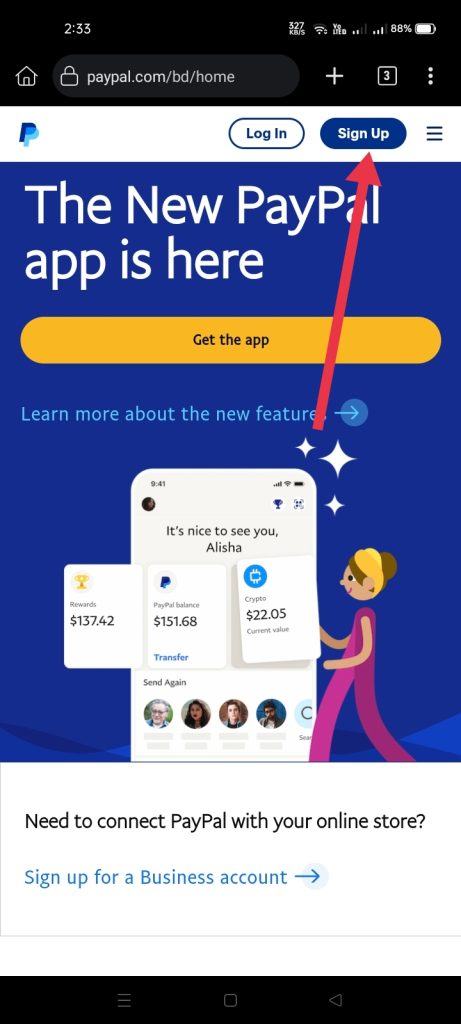
👉 Visit : www.paypal.com
Click “Sign Up” button pe (top right corner).
🔹 Step 2: Choose Account Type
You Will See Two Option :
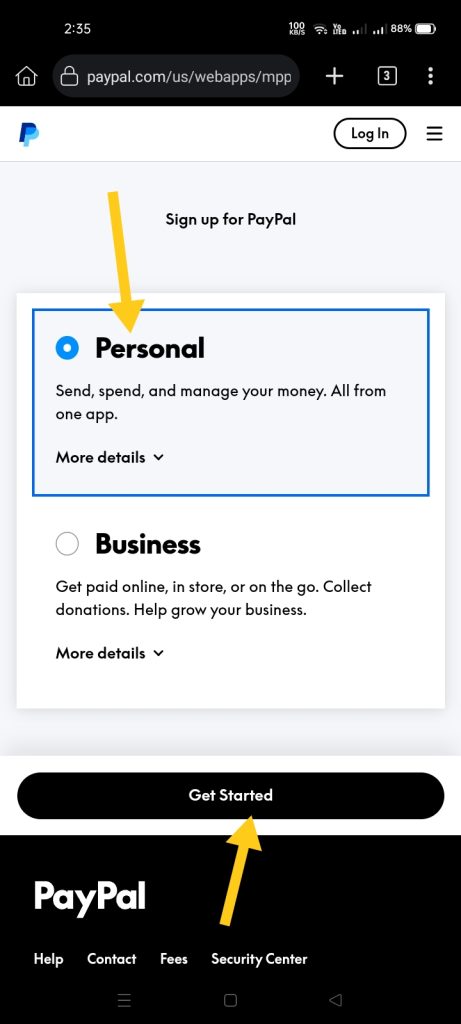
- Personal Account (freelancing/shopping)
- Business Account (For business use)
✅ Select Personal Account → Click “Next”
🔹 Step 3: Basic Info
Fill :
- First & Last Name
- Email Address
- Strong Password (numbers/symbols)
Click Next .
🔹 Step 4: Enter Address & Mobile Number
Select Country → Verify Mobile Number (SMS will come)
After entering the address click on “Agree and Create Account”.
🔹 Step 5: Do Email Verification
Open your email inbox and click on the PayPal verification link.
Your account has been created! 🎉
🔒 Card Link (Optional But Useful)
By linking a card you can:
- You can make online payment
- You will be able to verify your account
- Will you be able to withdraw freelance income
How to do:
- Open Dashboard
- Click on “Link a card”
- Enter Card details (number, expiry, CVV)
- PayPal will charge $0.01 or $1 for the test (you will get a refund)
🔔 Pro Tip: You can also use Pioneer card or international bank card.
⚠️Common mistakes of beginners (be careful)
| Mistake | why is it wrong |
| ❌ using fake information | can get your account banned. |
| ❌ Creating two accounts | can get you duplicate accounts. |
| ❌ Skipping verification | can cause problems in withdrawal. |
| ❌ Using fake VPN location | can be risky and illegal. |
✅ Always use original information.
🌍 If PayPal is not supported in your country?
For example, in Bangladesh, Pakistan or some other countries, PayPal is not fully supported. Then you can try these options:
- Using friend/relative’s address (e.g. UAE, USA)
- Payoneer use karo as alternative
- Withdraw indirectly using Wise account or international bank.
❌ Never trust fake or illegal agents.
🙋♂️ Personal Tips (I am talking about 10 years experience)
- Use a clean browser, clear the cache
- Don’t use VPN unless it is necessary
- Name, address, ID – everything should be consistent
- Take a screenshot of every step – for reference
- Be patient – PayPal sometimes takes time to verify
🎉 That’s it, it’s done!
Your PayPal account is ready ✅
Now you:
- Can take payment from clients
- Can do shopping
- Can start freelancing journey!
✍️ Final Words
“Every expert is first a beginner.”
You started – this is the biggest step. If you need help or are stuck somewhere, comment or send a message – I am here to help.